Submission (EPS)
Published on: 16th July 2013 | Updated on: 16th July 2026
Support for pharmacy teams on how to endorse EPS prescriptions correctly, complete monthly submissions, and carry out payment reconciliation:
Serious Shortage Protocols (SSPs)
Some IT systems may prompt pharmacy teams if SSP information is incomplete, for example if the SSP number is missing or not in the correct format. Some systems may also prevent an EPS claim from being submitted if the required SSP details have not been entered.
Read more: SSPs.
Endorsement information required by NHSBSA
Only essential information needed for pricing should be sent electronically to the Pricing Authority. Details of the dispensed product will be provided using the dm+d code.
Other endorsements may still be required as usual, such as broken bulk, out‑of‑pocket expenses or any NCSO concession details. Most pharmacy systems will support pharmacy teams by enabling these endorsements electronically.
Useful resources include:
If endorsements are still being recorded manually, pharmacy teams must begin using their pharmacy system to record them electronically in future.
A common reason for EPS returns is a missing invoice price endorsement for a non‑Part VIII product where NHSBSA holds no price.
When dispensing a non‑Part VIII drug, the EPS message must include:
- the quantity dispensed (if different to the prescribed quantity)
- the pack size used
- the brand name or manufacturer/wholesaler details if the item was ordered in generic or pharmacopoeial form
This information may be populated automatically by selecting the actual medicinal product pack (AMPP) supplied. Processes vary across different IT systems, so check your IT supplier’s guidance if needed.
Some IT system suppliers have added prompts to help ensure mandatory information is added, which can reduce the number of EPS returns. Pharmacy owners can provide feedback via: cpe.org.uk/reportIT
Endorsing non‑Part VIII EPS items
Below are examples of how to endorse items correctly.
- Endorsing by selecting the AMPP (when NHSBSA holds a price)
Your IT system may allow you to select the AMPP supplied. NHSBSA will then price the item using the dm+d reimbursement price.
Ensure the correct AMPP is selected to avoid being reimbursed for the wrong product or pack size.
- Endorsing invoice price (IP) when NHSBSA holds no price
If NHSBSA has no price for the item, include the invoice price and pack size used.
When adding an invoice price to an AMPP endorsement, ensure both match the pack size supplied.
- When the AMPP is not listed on dm+d
Return the prescribed VMP with an invoice price endorsement. Include the price, pack size and supplier details.
If there is a dm+d mapping or listing error, follow the reporting process outlined on the dm+d webpage.
For details on ‘FS’ endorsement, see the section below.
Exemption factsheet
Read our EPS exemption factsheet.
Prescription charge or exemption status
Pharmacy teams must record whether a prescription charge was taken, along with the exemption category and whether evidence was seen. An exception applies where the patient is age‑exempt and their date of birth is included in the EPS message.
For EPS, systems may automatically determine age exemption by comparing date of birth with the dispense notification date. If the declaration is recorded at a different time, the system may prompt pharmacy teams to confirm exemption manually.
Old and new patient charge rates
For paid EPS prescriptions dispensed before the end of March in any financial year:
- If the dispense notification (DN) is submitted on 31st March and the claim is received by NHSBSA by 5th April – the prescription is treated as March dispensing (old charge rate).
- If the DN is submitted on 1st April and the claim is received by 5th April – the April dispensing (new charge rate) applies.
- If the DN is submitted on 31st March but the claim is received on or after 6th April – the April charge rate applies (outside the five‑day window).
IT supplier enhancements to support data input
Pharmacy IT systems vary in how they support exemption recording. Pharmacy owners may wish to check:
- Does the system default to ‘paid’ if exemption information is missing, or does it prompt staff to confirm exemption before submission?
- If exemption details (e.g. PPC) are already stored, does the system pre‑populate this in the claim message?
- Does the system prompt staff when exemption certificates have expired?
- Is there a clear overview screen to check whether exemption details have been recorded?
Some systems may also need to handle EPS contraceptive items carefully to ensure they reconcile correctly with NHSBSA counting rules.
Free‑of‑charge (FOC) items
FOC status applies at item level. Prescribers are encouraged to place FOC items on separate prescriptions to make processing easier for pharmacy teams.
If an EPS prescription includes both an FOC item and a non‑FOC item, the FOC status only applies to the FOC item.
Contraceptive FOC status
Although category X has been removed from FP10 forms, the EPS message code ‘X’ (0010) still exists because a code must be populated before an EPS claim is submitted.
Contraceptive FAQ
I received an electronic prescription for a contraceptive that was incorrectly marked as ‘paid’. Will a charge be deducted?
A. Contraceptives listed in the Drug Tariff’s ‘No Charge Contraceptives’ section, devices in Part IXA, and spermicidal products are automatically exempt. Even if submitted as ‘paid’, no charge is deducted.
Electronic prescriptions for other drugs are also exempt if the prescriber has added the ‘CC’ endorsement. This applies even if the pharmacy submitted it as ‘paid’.
There is still a requirement for a completed exemption declaration where relevant.
EPS scripts with both FOC and non‑FOC items
Ideally, FOC contraceptives should not appear on the same prescription as chargeable items.
Where this happens, there is a risk of incorrect charge deductions, particularly if the contraceptive message code is applied at prescription level instead of item level.
Some IT systems will help prevent this by blocking inappropriate category selections.
Community Pharmacy England, the Community Pharmacy IT Group and NHS IT teams have raised these issues with all IT system suppliers.
Feedback can be submitted at: cpe.org.uk/reportIT
Free supply (FS) FOC status
The prescriber can make an FS endorsement where their system allows. It applies to:
| FS reasoning allowed | Anticipated volumes within community pharmacy |
| Sexually transmitted item (STI). | May appear within some community pharmacies |
| Tuberculosis (TB) (since 1st December 2025) | |
| Other reasoning may be specified as required, and in alignment with charges regulations. | N/A |
Patients receiving FS items do not need to sign a declaration or provide proof of entitlement.
EPS requires message code 0017 for FS‑endorsed prescriptions containing only FS items. Some systems may add this automatically.
In late 2025, EPS IT suppliers were advised to update labelling to reflect the new TB‑related FS use.
If a GP system cannot apply the FS endorsement electronically, prescribers should issue a paper prescription with FS written next to each relevant item.
Future and recent exemption changes
Those young persons leaving care
- It was announced that young people leaving care will be entitled to free NHS prescriptions up to the age of 25. Further communications to follow. As this will require changes to legislation and operationalisation, this entitlement is not likely to come into force for many months.
For practical guidance on entering dose instructions correctly, see the EPS dispensing dose area section, our Avoiding EPS product info in the dose area one‑pager, and the information at cpe.org.uk/dosearea.
When you dispense an item, your team must send a Electronic Reimbursement Endorsement Messages (EREMs) to the Pricing Authority. This includes all endorsement details and the patient’s prescription charge status. You can send this at the same time as the dispensed notification message or later in the month.
Submitting claims regularly helps protect your records if your IT system crashes and you need to restore information from a previous back‑up.
You can find more guidance in the endorsing and submission section.
A FAQ below sets out the arrangements for amending claim messages:
- Will the Pricing Authority allow me to amend a prescription after I have already sent it to them for pricing?
A. Paper prescriptions cannot be changed once they have reached the Pricing Authority.
For electronic prescriptions, you may be able to amend information — such as an incorrect endorsement or a patient’s exemption category — after a claim message has been submitted, provided that:
- your IT system supplier has enabled the recall function; and
- it is before the deadline on the 5th day of the month after the month of supply.
After this deadline, the Pricing Authority begins pricing and the prescription cannot be recalled.
If these conditions are met, your IT system should allow you to recall, correct and resend the electronic prescription.
Some system suppliers now offer a claim acknowledgement feature. This confirms within your system which claims have been received by NHSBSA, giving assurance that technical issues have not prevented transmission through the NHS Spine.
This feature appears on our IT system wishlist. Suppliers prioritise developments based partly on ongoing feedback from pharmacy owners and teams. Read more at: https://cpe.org.uk/systemlist
See: Submitting in time
Resolving issues with EPS returns
Sometimes the Pricing Authority may return electronic prescriptions to pharmacy owners if there is not enough information for them to process the item correctly. Their staff may also phone the pharmacy to resolve any issues quickly.
FAQs: EPS returns
Q. I dispensed an electronic prescription for a non‑Part VIII generic last month. The NHSBSA Pricing Authority has returned it and asked for the invoice price. Why has this happened?
If the NHSBSA does not have enough information to process an electronic prescription, it will be returned. Early indications show that electronic prescriptions need clarification far less often than paper prescriptions. The most common reason for a return is when a non‑Part VIII item has been dispensed but the prescription does not include the required invoice price. This can happen if the product is less common and no price is held by the Pricing Authority.
One way to help reduce these returns is for IT system suppliers to build in a control that requires an invoice price to be entered before the prescription is submitted, when no indicative price appears in dm+d. Pharmacy owners may want to discuss this with their supplier.
See also: Prescription returns.
Advance payment timescales
Pharmacy owners receive an advance payment one month after submitting their FP34C Form. This advance is based on the prescriptions sent to the Pricing Authority, with a deduction for prescription charges collected. One month later, once pricing is completed, owners receive the actual reimbursement and the advance amount is recovered. You can read more about this timing here.
Timescales for paper versus electronic prescriptions
The payment timescale does not change under EPS Release 2. Community Pharmacy England continues to press for quicker payments for community pharmacies and hopes that, over time, the efficiencies created by EPS will support this.
See Reconciling EPS totals one-page factsheet
See also:
- EPS and Accuracy
- Reconciling payments page
- Information Services Portal (ISP) by the NHSBSA
- Getting Px Reports factsheet
Electronic Prescription Service (EPS) messages move between prescribing and pharmacy systems through the NHS Spine. Each prescription is linked to the patient’s NHS number and medicines, and a set of unique identifiers helps connect prescribing, dispensing and claiming activity. These identifiers also ensure that the NHS Business Services Authority (NHSBSA) can process payments correctly.
At times, you may need to look up an older EPS prescription on your IT system. This may be to check that pricing was applied correctly, or because the Pricing Authority has requested more information.
You can search for a prescription in three main ways:
- by patient or their NHS number where this is known;
- using the EPS token ID or equivalent ID within barcode – ID (2) within the table; or
- using the UUID used within the Pricing Authority’s Transparency Portal if your system supplier allows yet – ID (7) within the table.
| Identifier category | Identifier | Information |
|
GP system-generated
|
(1) Prescription Form UUID* (long) | This universally unique identifier (UUID) is generated by the prescriber system. |
| (2) Short Prescription Form ID – token ID |
|
|
| (3) Prescription Line Item UUID* | Each line also has its own UUID. | |
|
Pharmacy system-generated: Dispensing
Note: If a dispense line or form |
(4) Dispense Notification Supplied Line Item UUID* | This line ID is generated for each dispensing episode entered onto the PMR system (e.g. owings). The Pricing Authority only need to receive last one. |
| (5) Dispensed Notification Form UUID* | Generated when pharmacy team sends the overall dispense message for form. | |
|
Pharmacy system-generated: Claiming
|
(6) Dispense/Claim Form UUID* | Generated when pharmacy team sends the overall prescription claim notification. Where claim amend feature used this will be regenerated. |
| (7) Dispense/Claim Supplied Line Item UUID* | This ID is used within the Pricing Authority’s Transparency Portal**. Speak to your system supplier about whether they will soon allow search by the Transparency Portal EPS ID if they do not already. | |
|
Generated for use by Pricing Authority
|
(8) Dispense Reimbursement Claim ID |
Spine generates this for sending to BSA, after pharmacy send final claim notification. Suppliers could not allow any lookup by this ID even if they wished to. This ID is only used by the Pricing Authority. |

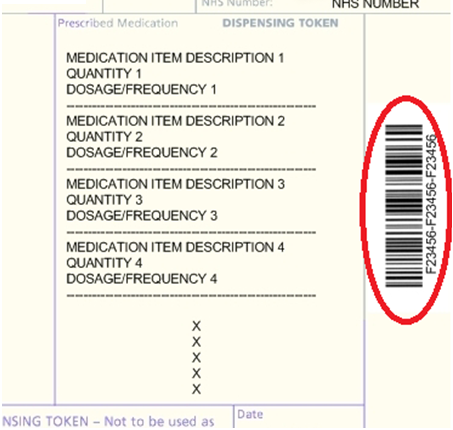



*Indicates a ID composed of 32 characters plus four hyphens
**Information from the Pricing Authority. See column BP, of your Prescription Item report visible from within the Transparency Portal.
Data protection considerations
Unique prescription identifiers should be treated as personal data. While most people will not have the tools to link these IDs to wider datasets, data protection requirements encourage all organisations to handle such information sensitively.
Additional information
See also the Using EPS identifiers webpage
Endorsing EPS
Q. How are additional endorsements such as ‘XP’ be handled in EPS?
When a dispensed product needs to be identified, the Pricing Authority will use the NHS dm+d SNOMED code included in the electronic message. Other endorsements, such as broken bulk, out of pocket expenses or NCSO claims, will continue to be required. Pharmacy IT systems will support pharmacy teams to add these electronically in line with current endorsement guidance.
Q. How do we indicate that an EPS item has not been dispensed?
This varies between IT systems. If unsure, consult your system manual or your IT system supplier. According to the Pricing Authority endorsement manual, undispensed items are given the status code ‘0002’. Electronic prescriptions use this code instead of the ‘ND’ endorsement, which should only be used on paper prescriptions.
Submitting EPS
Q. Will the Pricing Authority allow me to amend an electronic prescription after I have already submitted it?
Paper prescriptions cannot be changed once received.
Electronic prescriptions may be recalled and amended if:
• your IT system supplier supports recall functionality; and
• the recall is completed before the fifth day of the month following supply.
After this deadline, pricing begins and the prescription cannot be changed. Some scenarios may also involve internal recheck processes.
Q. I see that supplementary product information (such as ‘unlicensed’ or a brand name) has been typed into the dose area. Will the prescription be priced correctly?
There is a risk this information may be overlooked. Electronic pricing is based on the product code selected by the prescriber, so text entered into the dose field is not considered when calculating payment. In some situations, the prescriber may need to re‑issue the prescription correctly. Further support is available in our EPS dose area resources and related factsheets.
Q. Can I submit all my electronic prescriptions at the same time?
Submitting large batches can take a long time depending on your IT system and any wider technical issues.
Q. How can I reconcile the number of prescriptions I have submitted with the number priced by the Pricing Authority?
Include the total number of submitted prescriptions on the FP34C form and keep a copy. If there is a significant difference between the total you submit and the total counted by the Pricing Authority, they will contact you. The number on your Schedule of Payments should closely match your FP34C totals. Further guidance is available on submission and claiming EPS Release two prescriptions on time.
Q. I have part‑dispensed an item and am waiting for the patient to collect the remainder. Can I claim for this?
Pharmacy owners should use their judgement, as with paper prescriptions, when deciding how much reimbursement to claim at each stage.
Q. If the prescriber wishes to issue ‘Ensure Plus’ as ‘assorted flavours’. How is this done EPS Release two?
Yes. Prescribers can request assorted flavours by issuing the Virtual Medicinal Product and adding an endorsement for assorted flavours. Pharmacies will continue to receive one Single Activity Fee for each flavour dispensed. EPS systems only include items listed in the NHS database, so assorted flavour listings are handled via the prescriber endorsement.
Q. I had to dispense a prescription from two different pack sizes. Can I claim electronically in the same way as before?
Yes. Two different SNOMED codes can be recorded in the same dispensing event. For example:
- Prescribed – Drug A SNOMED code, quantity fifty
- Dispensed – Drug A (pack size one) SNOMED code
- Dispensed – Drug A (pack size two) SNOMED code
Q. I have a prescription for ‘Levothyroxine Sodium 100mcg tablets (Actavis UK)’. Must I dispense this brand and how will I be reimbursed?
If a manufacturer or supplier name is included on a generic prescription, you must supply that product. Reimbursement will be based on the manufacturer’s list price rather than the Drug Tariff. Out of pocket expenses may be claimed where appropriate. Pharmacy owners experiencing issues with prescribers issuing brand‑specific generics should discuss this locally as it can lead to delays and increased costs.
Q. Do NHSBSA begin pricing electronic prescriptions as soon as they receive them?
No. Pricing only begins once the FP34C form is received at the end of the month. This form covers both paper and electronic prescriptions.
EPS exemptions
Q. Do I need to record a patient’s exemption status in the electronic claim message?
Yes. Every electronic prescription must indicate whether a charge was levied and, where applicable, record the exemption category and whether evidence was seen. If the patient is not age‑exempt or has paid the charge, the back of a prescription or dispensing token must also be completed and submitted. Payments are based solely on the electronic message, so accuracy is essential.
Q. A patient was fifty‑nine when the prescription was written but sixty when they collected it. Are they exempt?
Yes, as long as the prescription is still valid. Eligibility is determined at the time the patient makes the declaration, not the date the prescription was written. Systems may auto‑apply age exemption but can be overridden where necessary.
Q. If a patient brings in an EPS Release prescription token from their GP practice, can this be used for the exemption declaration?
Yes. The declaration may be made on either a prescription token (printed by the GP practice) or a dispensing token (printed by the pharmacy).
Q. I have an electronic prescription for four items which printed across two tokens. Does the patient need to sign both?
No. One completed declaration is enough. Both tokens must still be submitted, as they relate to the same electronic message and barcode.
Q. Will my system show whether an EPS prescription includes ‘no charge’ items?
This follows the same process as paper prescriptions. NHSBSA determine the number of fees and charges. IT system suppliers have flexibility in how they support reconciliation.
Q. A contraceptive prescription was marked as ‘paid’ in error. Will a charge be deducted?
No charge will be deducted for items listed as ‘no charge contraceptives’ in the Drug Tariff or where the prescriber has endorsed ‘CC’ in the electronic message, even if the pharmacy marked the claim as ‘paid’.
Q. Do tokens for specials need to go into a red separator?
No. Tokens are not used for pricing. They are only used for audit and should be filed separately but do not need to be sorted in GP order.
EPS pricing accuracy
Q. How are EPS prescriptions priced?
A. Electronic prescriptions are processed by an automated rules engine, which should improve accuracy by reducing human error found in paper‑based processing. Community Pharmacy England conducts external audits of pricing accuracy and continues to work with the Pricing Authority on future audit arrangements.
View the five minute video below to learn about the key EPS submission requirements:
Briefings and factsheets
- Comparing EPS total items: submitted vs priced
- EPS dose area: and exlcuding product info from within it
- Summary of EPS-related forms and tokens
To share and hear views about digital developments with like-minded pharmacy team members, join the CP Digital email group today.
For more information on this topic please email it@cpe.org.uk