Tokens (EPS)
Published on: 12th August 2014 | Updated on: 14th September 2026
Paper copies printed to accompany electronic prescriptions are called tokens. The barcode on a token can be scanned to download the electronic prescription from the NHS Spine.
Our factsheet, Summary of EPS‑related forms and tokens, explains how to recognise each type.
Ordering tokens is usually done through the PCSE pharmacy stationery and the EPS token online ordering portal. More detail is included below.
Primary Care Support England (PCSE) supplies a range of stationery for community pharmacies, including EPS tokens.
How to order
Pharmacy teams should order EPS tokens via the PCSE pharmacy stationery online ordering portal, which also supports ordering other supplies.
Continuity tip: Each pharmacy has one shared account, and several people can be linked to it. Ensure multiple users are configured so ordering can continue during unexpected absences.
Setting up a new account:
Register using the PCSE contact us form, and select “Register for PCSE online” in both the enquiry category and enquiry type fields. A standard forgotten password process is available if needed.
Portal use and updates:
The portal can be checked for delivery updates and in‑portal messages. It is designed for desktops or laptops and is not optimised for phones or tablets.
An escalation process is available if you experience problems.
Escalation process
If you have used the online portal but still cannot obtain the tokens you need, follow these steps (also detailed in our EPS token ordering and escalation factsheet):
- Write to PCSE using the contact us form and keep a copy of what you send. In some cases, you may instead email urgentsupplies@nhs.net about delayed portal orders. Include delivery references, your ODS code, your contact details, and the date you expect to run out of tokens.
- You may also call PCSE on 0333 014 2884 to follow up on your written request.
- Email PCSE every day if delays continue, or if you are struggling to register for the portal. Many pharmacy owners receive deliveries on a specific day each week. In urgent cases, you may phone PCSE again, but always refer back to your written communication.
- Check junk email folders for missed messages.
- Continue emailing PCSE daily and keep a record of every message. If using urgentsupplies@nhs.net, always reply within the same chain to retain the full history.
- If you have received no response after three working days, email your full correspondence trail to it@cpe.org.uk and team@cpe.org.uk. Explain the steps taken and your current situation, for example: I have enough EPS tokens for the next two days. Include delivery references and your ODS code.
- Contingencies: If you risk running out of tokens, see the Contingencies section of this webpage for final‑resort steps.
Supply issues
PCSE may add notes to the portal if supply issues arise. Pharmacy owners should escalate per the above process whenever token stock is low or an order remains unresolved.
Ordering quantities
At times, the portal allows orders of:
- up to four boxes of 2,000 tokens (8,000 tokens total); and
- once every seven days.
This level is usually sufficient for most pharmacies. These limits help maintain a fair national supply and prevent excessive stockpiling. Busy pharmacies can request more through the escalation route, including via pcse.urgentsupplies@nhs.net.
PCSE may change ordering limits if needed.
Deliveries
PCSE has rolled out fortnightly scheduled collections/deliveries, starting in April 2026. The collection/delivery day will remains the same, and only the frequency will change.
Pharmacy owners are encouraged to place supply orders with PCSE well in advance to help ensure a continuous stock and avoid any potential service disruptions.
There are two types of token:
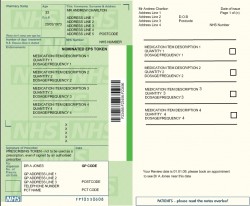
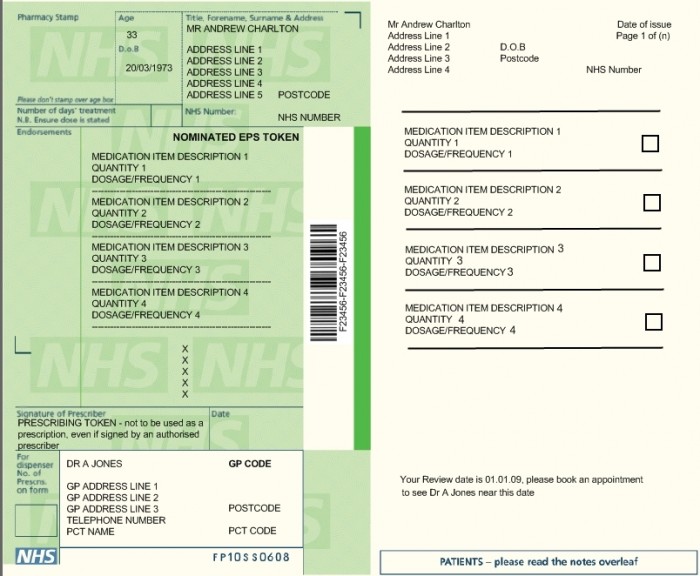
- Prescription token (issued by the GP)
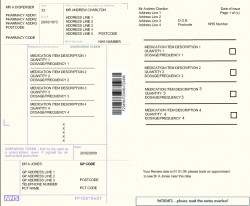
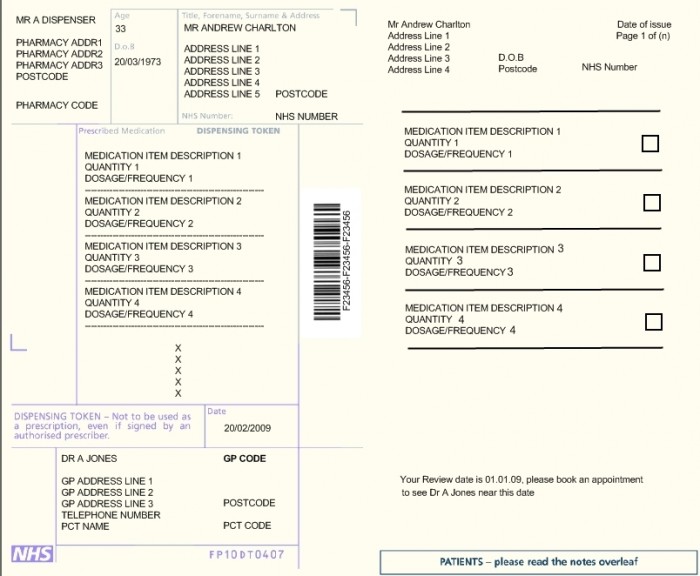
- Dispensing token (issued by the dispenser)
Both are paper copies of information from the electronic prescription. Neither can be used to dispense items without the corresponding electronic message.
 |
Prescription Tokens (issued by GP) |
 |
Dispensing Tokens (issued by dispenser) |
Read more in the Summary of EPS‑related forms and tokens factsheet.
Tokens that require printing
Two types of dispensing tokens must be printed in certain situations:
- When the patient needs to use a different pharmacy (for example, due to a stock shortage):
If the patient’s nominated pharmacy has already downloaded a prescription but cannot be supplied, the items must be returned to the Spine and a dispensing token printed. This allows the patient to go to another pharmacy. All items must be returned, not only the out-of-stock ones. - For patients who pay or need to make an exemption declaration:
A dispensing token must be printed when a patient pays a prescription charge or makes an exemption declaration, unless they are age‑exempt or their exemption has already been confirmed through the Real Time Exemption Checking (RTEC)
If the patient already has a prescription token printed by the prescriber, this can be used for the exemption declaration.
Optional printing
Dispensing tokens may also be printed on request or to share supplementary clinical information. Tokens contain identifiable information, so they must be destroyed securely.
PCSE supply Form FP10DT (white) free of charge. Dispensing tokens do not need secure storage because they are not legal prescriptions. Pharmacy owners should work with Local Pharmaceutical Committees (LPCs) and NHS England teams to agree local arrangements.
Read more in the Dispensing tokens FAQs and the section on token submission to NHSBSA.
Prescribers print prescription tokens on Form FP10SS. Standard text appears in the signature box to prevent accidental signing.
When prescription tokens are issued
Electronic prescriptions can only be issued:
- when a patient has nominated a pharmacy, and
- by GP practices piloting Phase 4.
Required printing for non-nominated prescriptions
- When must prescribers print a prescription token?
A. A token must be printed for every non-nominated (Phase 4) prescription.
Non-nominated (Phase 4) prescription tokens
Phase 4 sites issue tokens for all electronic Phase 4 prescriptions. The NHS England token specification currently covers only paper tokens.
Non-nominated prescription tokens.
Prescribers may choose to issue a token when a patient has nominated a pharmacy, for example, to provide a copy of the information or to indicate the end of a consultation.
The right-hand side of these tokens displays the nominated pharmacy’s details, helping patients remember whom they have nominated.
If the patient brings the token to the nominated pharmacy, its barcode can be scanned to download the prescription. If the prescription has not yet been downloaded, another pharmacy can still access it.
Top tips
- Order well ahead: Avoid leaving orders until the last minute.
- Have several trained users: Link more than one person to your PCSE ordering account to support continuity.
Contingency planning
EPS tokens must be printed on official token paper supplied by PCSE. A broken printer or lack of toner can cause operational issues, so include printing arrangements in your business continuity plan.
If you urgently need to record exemption declarations but cannot print tokens, pharmacy teams have considered the following last‑resort options:
- Borrowing tokens.
- Handwriting the token: Include at least the patient’s name and the prescription ID number.
- Recording details temporarily in a bound book:
Some pharmacies have done this, asking patients to write their name, date, prescription ID, and exemption status. Staff then complete the reverse of the token later as the patient’s agent.
However, this is not recommended by NHS Protect or Community Pharmacy England due to risks associated with exemption accuracy and potential patient disputes. All liabilities remain with the patient, but there have been cases where Counter Fraud teams have contacted patients due to errors. For this reason, handwritten agent signatures should not be used unless proof of exemption is available.
Jamming issues
Xerox supplies EPS token paper. PCSE distributes it but does not manufacture it.
For printer‑jamming problems, contact the Xerox helpdesk at 0300 123 0849 or nhsorders@xerox.com. If problems persist, ask your IT system supplier to check printer settings.
Tips to reduce jamming risk
- Avoid heavy continuous printing: Allow the printer to cool between batches.
- Reduce unnecessary printing: Some pharmacies added extra terminals, which reduced printing volume and extended printer life.
- Use thin‑paper settings where available: For example, some Brother printers offer thin‑paper and lower‑heat settings.
- Do not mix paper types: Use only one paper type per tray.
- Ensure trays are set correctly: Adjust guides and loading carefully.
Technical specifications are available at cpe.org.uk/specs, including:
- dispensing token specification (paper)
- prescribing token specification (paper)
The Community Pharmacy IT Group (CP ITG) has recommended the development of paperless prescription processing, including digital tokens and updated NHS England standards for Phase 4.
Digital token future standards
Some GP practice apps display barcodes or prescription IDs, but these may not meet NHS England’s formal token specification, which currently only covers paper.
CP ITG welcomes pharmacy team feedback on digital token requirements. Email it@cpe.org.uk to share your views.
Digital tokens within the NHS App
Patients can now view EPS information, including digital tokens, inside the NHS App.
NHS England expects other approved app developers will be able to support digital tokens in future.
More information about the digital EPS token is available through NHS England.
Standard arrangements
Your monthly submission to the NHSBSA must include certain EPS tokens.
Which tokens should be sent?
Community Pharmacy England advises submitting the following:
- tokens used to record an exemption signature (unless the patient is age‑exempt or exempt via RTEC);
- tokens for patients who have paid a prescription charge;
- tokens used to make a claim under a Serious Shortage Protocol (SSP).
These are required for audit only. Pricing is based on the electronic message and exemption category applied within EPS.
Controlled drug (CD) tokens
We have produced CD-specific FAQs after discussions with NHSBSA and NHS England.
CD token FAQs
- Do I need to record who collected a CD on the EPS token?
A. No. This is not required. However, the Royal Pharmaceutical Society advises collectors of Schedule 2 and 3 CDs to sign on the reverse of the form. This can be recorded on a token or electronically in your IT system supplier’s system. - Why capture a collector’s signature?
Teams have found it useful when dealing with queries about whether a CD has already been collected. Tokens sent to NHSBSA cannot be retrieved for this purpose. - Which CD tokens must be submitted?
Only the tokens listed earlier (paid or non‑age‑exempt) must be sent. Age‑exempt CD tokens do not need submission unless your team chooses to keep them for audit queries.
Key points on token submission
- Timing: Submit tokens in the same month as the corresponding electronic prescriptions.
- Tick box: Mark the ETP Token for non‑payment box on the FP34C.
- Sorting: Secure tokens at the top of the relevant exempt or chargeable group.
- Prescriber order: There is no need to sort by prescriber.
- EPS Release 1: These do not require separate securing.
Tokens that do not need sending
Tokens not required for submission can be securely destroyed in line with data protection and local processes.
See also the NHSBSA guide Submitting EPS tokens.
Tokens not required for submission need not be retained. They should be securely destroyed in accordance with data protection laws and your pharmacy’s information governance procedures.
Supplies, ordering and escalation
Q. How long does it take to get a PCSE online ordering portal account for a new pharmacy?
It takes several working days. Set up your account well in advance. See also the ODS change checklist.
Prescription token FAQs
Q. The prescriber has signed the token. Does this make it a legal NHS prescription?
No. A signed token is not a valid NHS prescription. You will be reimbursed for the electronic prescription, not the token. To prevent signing, prescribing systems overwrite the signature box with a message stating that the token must not be used for prescribing.
Dispensing token FAQs
Q. What is the cost of EPS tokens?
Local NHS England teams provide Form FP10DT free of charge. Printing causes normal costs (ink, toner, printer maintenance). Some tokens still need to be submitted to NHSBSA. CP ITG and Community Pharmacy England support future digital solutions that reduce paper use.
The PCSE portal may display notional valuations for token paper, but pharmacy owners are not charged for them.
Q. Must I submit EPS tokens for free‑of‑charge (FOC) items?
No. The newer prescription form introduced from early 2020 does not include a tick box for FOC items such as contraceptives or FS‑endorsed products. Tokens for FOC items do not need to be submitted. If the prescription also contains chargeable items, normal claiming rules apply.
Q. Can dispensing tokens be reprinted?
Yes. Reprints are exact copies. Some IT system suppliers may label them as duplicates or alert you if the token was printed previously.
Q. Do I need a specific printer for tokens?
Your IT system supplier can advise. As a minimum, a 600 dpi mono laser printer is required. Dual‑bin printers are recommended.
Q. My system automatically prints tokens for all prescriptions. What should I do with unwanted tokens?
Tokens with patient information must be shredded securely. If you give a token to a patient as a reference, remind them it cannot be used to have the item dispensed elsewhere.
Q. Can a Release 1 system process an EPS token?
No. EPS Release 1 systems cannot scan EPS Release 2 barcodes.
Further info
Read more at:
- EPS token ordering and escalation factsheet
- Summary of EPS-related forms and tokens
- Factsheet: Phase 4 token vs Paper prescription comparison factsheet
For more information on this topic please email it@cpe.org.uk